
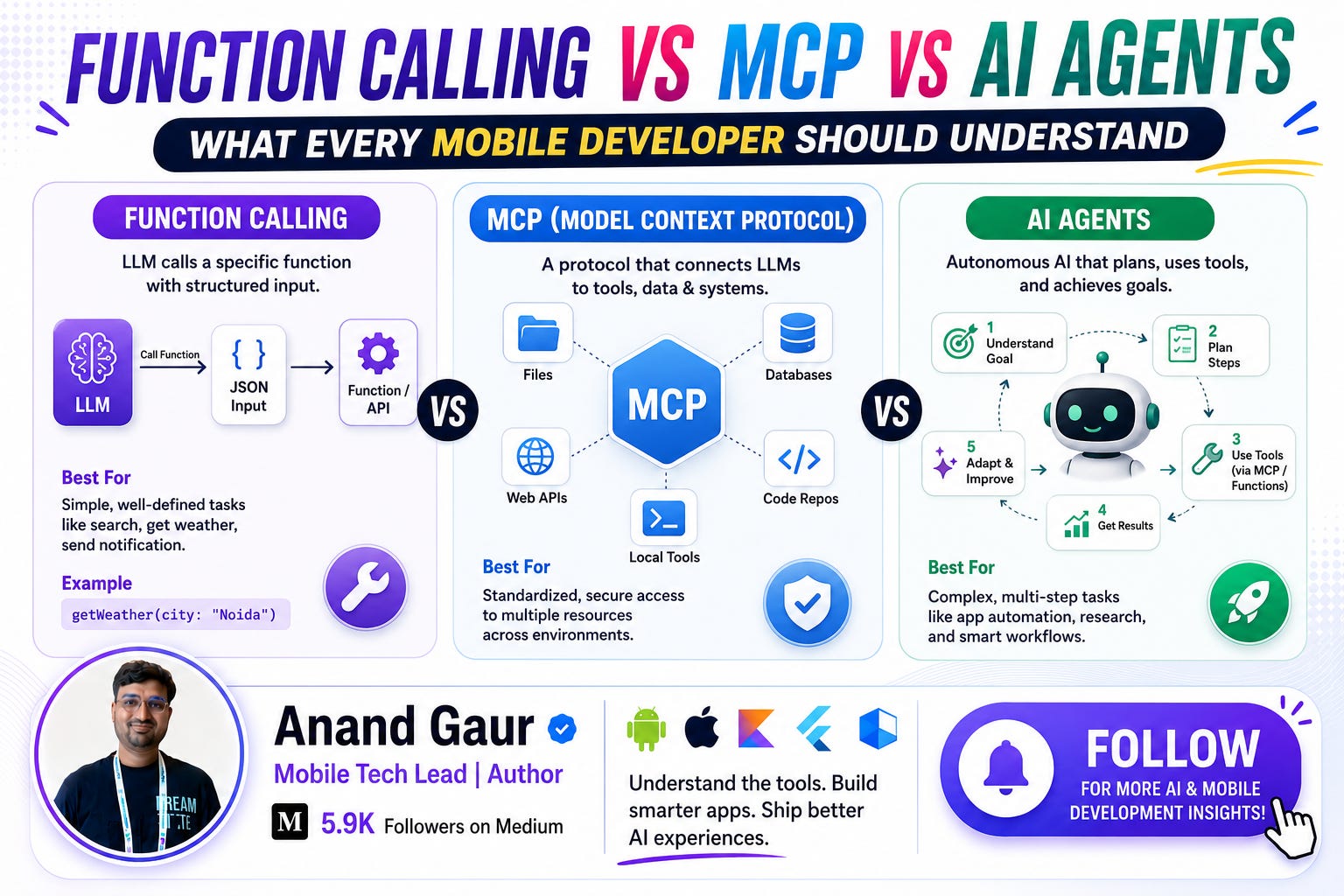
If you are a mobile developer in 2026 and you have not yet added AI features to your app, trust me, you are already getting these requirements in your sprint planning. And the moment you start exploring AI integration, three terms hit you from every direction: Function Calling, MCP, and AI Agents.
Most developers use these terms interchangeably. They are not the same thing. In fact, once you understand how they relate to each other, your entire mental model of building AI-powered apps becomes crystal clear.
In this blog, I will explain all three from absolute basics to advanced level, in simple way, with real examples from a mobile developer’s perspective. By the end, you will not need to read another blog on this topic. That is my promise.
Let’s start.
First, Understand the Core Problem
Before jumping into definitions, let’s understand why these three things even exist.
A Large Language Model (LLM) like Gemini, Claude, or GPT is fundamentally a text-in, text-out machine. You send it text, it sends back text. That’s it.
This means an LLM, by itself, cannot:
-
Check today’s weather
-
Read your app’s database
-
Book a cab
-
Send a notification
-
Call your backend API
-
Access the user’s calendar
It can only talk about these things. It cannot do them.
Think of an LLM as a very smart consultant sitting in a locked room with no phone and no internet. He knows a lot, he can advise you brilliantly, but he cannot take any action in the real world.
Function Calling, MCP, and AI Agents are three different answers to one question:
“How do we let this smart brain actually do things in the real world?”
Now let’s understand each one, step by step.
Part 1: Function Calling (The Foundation)
What is Function Calling?
Function Calling is a feature where you tell the LLM:
“Hey, here is a list of functions I have in my app. If the user asks something that needs one of these functions, don’t answer directly. Instead, tell me which function to call and with what parameters.”
That’s it. That is the entire concept.
Important point that confuses everyone: The LLM never actually executes any function. It only requests the function call. Your app code executes it. The LLM is like a manager who says “call the plumber”, but you are the one who actually picks up the phone.
How Does It Work? (Step by Step)
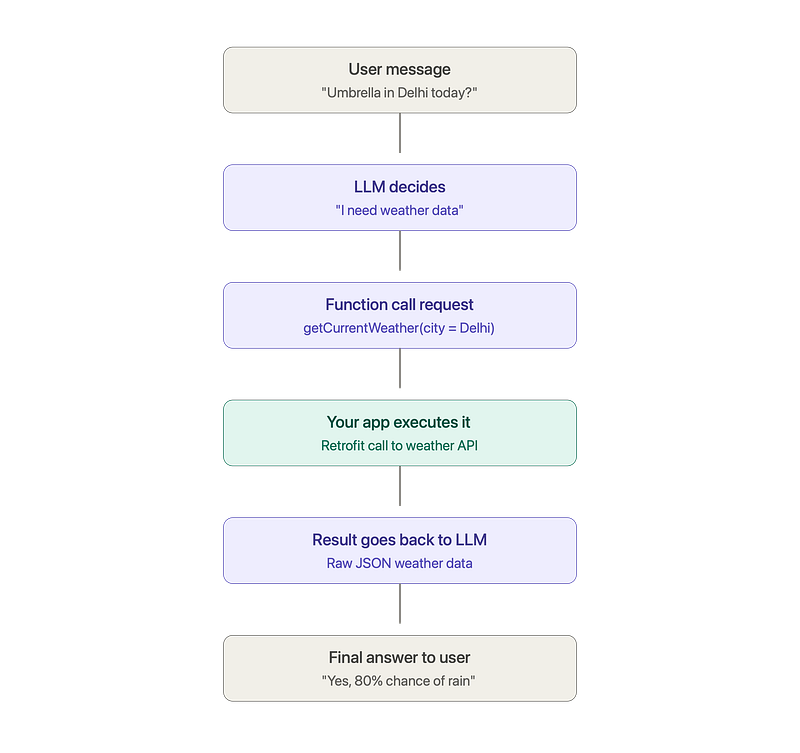
Let’s take a real mobile example. Suppose you are building a weather app with a chat feature. The user types: “Should I carry an umbrella in Delhi today?”
Here is the complete flow:
Step 1: You define your functions
You tell the model which tools exist. In Android with the Gemini SDK, it looks like this:
val getWeatherFunction = FunctionDeclaration(
    name = “getCurrentWeather”,
    description = “Get the current weather for a given city”,
    parameters = listOf(
        Schema.str(”city”, “Name of the city, e.g. Delhi”)
    )
)

val model = GenerativeModel(
    modelName = “gemini-2.0-flash”,
    apiKey = BuildConfig.API_KEY,
    tools = listOf(Tool(listOf(getWeatherFunction)))
)
Step 2: User sends a message
val chat = model.startChat()
val response = chat.sendMessage(”Should I carry an umbrella in Delhi today?”)
Step 3: The model responds with a function call request (not an answer)
Instead of replying with text, the model replies with structured data:
{
  “functionCall”: {
    “name”: “getCurrentWeather”,
    “args”: { “city”: “Delhi” }
  }
}
Notice what happened here. The model understood the user’s natural language, figured out that it needs weather data, picked the right function, and extracted “Delhi” as the parameter. This is the magic part.
Step 4: Your app executes the function
response.functionCalls.firstOrNull()?.let { functionCall ->
    if (functionCall.name == “getCurrentWeather”) {
        val city = functionCall.args[”city”] ?: “”
        val weatherData = weatherRepository.getWeather(city) // Your normal Retrofit call

        // Step 5: Send the result back to the model
        val finalResponse = chat.sendMessage(
            content(”function”) {
                part(FunctionResponsePart(”getCurrentWeather”, weatherData.toJson()))
            }
        )
        // finalResponse.text = “Yes, carry an umbrella! There is an 80% chance of rain in Delhi today.”
    }
}
Step 5: The model gives the final human-friendly answer
The model takes your raw JSON weather data and converts it into a natural reply: “Yes, definitely carry an umbrella. Delhi has an 80% chance of rain this afternoon with expected thunderstorms.”
The Complete Flow in One Picture
Real-World Use Cases in Mobile Apps
-
Food delivery app: “Where is my order?” → LLM calls
getOrderStatus(orderId)→ replies “Your biryani is 10 minutes away!” -
Banking app: “How much did I spend on food last month?” → LLM calls
getTransactions(category = "food", month = "June")→ summarizes spending -
Fitness app: “Log a 5 km run” → LLM calls
logWorkout(type = "run", distance = 5)→ confirms entry -
E-commerce app: “Show me red shoes under 2000 rupees” → LLM calls
searchProducts(color = "red", category = "shoes", maxPrice = 2000)
The Limitation of Function Calling
Function Calling works beautifully, but there is a scaling problem.
Every function is hardcoded into your app. If you want your AI to also access Google Calendar, you write calendar integration code. Want Slack? Write Slack integration. Want your company’s internal CRM? Write that too.
Now imagine you build 3 different apps and all of them need the same 10 integrations. You are writing and maintaining 30 integrations. And if OpenAI defines functions one way and Gemini defines them another way, you rewrite everything when switching models.
This is called the M x N problem. M apps multiplied by N tools equals M x N custom integrations. It does not scale.
This exact problem gave birth to MCP.
Part 2: MCP (Model Context Protocol)
What is MCP?
MCP stands for Model Context Protocol. It was introduced by Anthropic in November 2024 and has now become an industry standard adopted by OpenAI, Google, and many others.
Here is the simplest definition:
MCP is a universal standard that defines how AI applications connect to external tools and data sources.
The best analogy, and you will see this everywhere because it is genuinely perfect, is the USB-C port.
Before USB-C, every device had its own charger. Samsung had one, Apple had another, your camera had a third one. Your drawer was full of cables. Then USB-C came and said: “One standard port. Any device, any charger, any accessory. Everything just connects.”
MCP does the same thing for AI:
-
Before MCP: Every AI app writes custom code for every tool (custom chargers everywhere)
-
After MCP: Tools expose themselves through one standard protocol, and any AI app can plug into them (one universal port)
MCP Architecture (The Three Players)
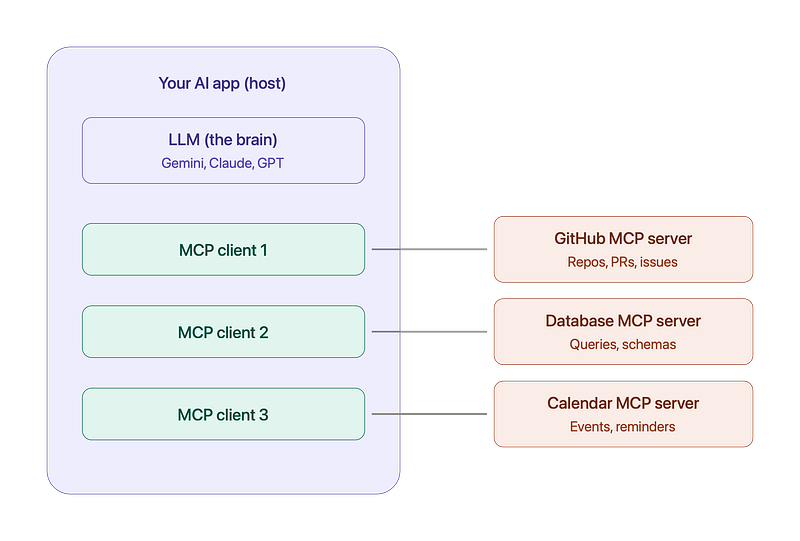
MCP has three components. Understand these three and you understand MCP:
1. MCP Host The AI application itself. For example, Claude Desktop, Cursor IDE, or your own Android app with an AI assistant. The host is where the LLM lives.
2. MCP Client A component inside the host that manages the connection to servers. One client connects to one server. The host can run multiple clients.
3. MCP Server A small program that exposes capabilities. A GitHub MCP server exposes repo operations. A database MCP server exposes queries. A file system MCP server exposes file operations.
What Can an MCP Server Expose?
An MCP server can provide three types of things:
-
Tools: Actions the AI can perform (send email, create ticket, run query). This is similar to function calling.
-
Resources: Data the AI can read (files, database records, documents). Like GET endpoints.
-
Prompts: Ready-made prompt templates for common workflows.
This is richer than plain function calling, which only gives you tools.
How MCP Actually Works (Step by Step)
Let’s say your app connects to a GitHub MCP server:
Step 1: Handshake. Your app’s MCP client connects to the server and asks: “What can you do?”
Step 2: Discovery. The server replies: “I have these tools: create_issue, list_pull_requests, search_code, and here are their parameter schemas.”
Step 3: The LLM gets this tool list. Now when the user says “Create a bug report for the login crash”, the LLM picks create_issue and fills in the parameters.
Step 4: Execution. The MCP client sends the request to the server, the server does the actual GitHub API work, and returns the result.
Step 5: The LLM turns the result into a natural reply.
Notice the key difference from function calling: you never wrote the GitHub integration code. The MCP server (built once by GitHub or the community) handles everything. You just connected to it.
The “Aha” Moment: MCP is Not a Replacement for Function Calling
This is the most important insight of this entire blog, so read this twice.
MCP and Function Calling are not competitors. They work together at different layers.
-
Function Calling is how the LLM tells your app “I want to use this tool”
-
MCP is how your app talks to the tool in a standardized way
The flow looks like this:
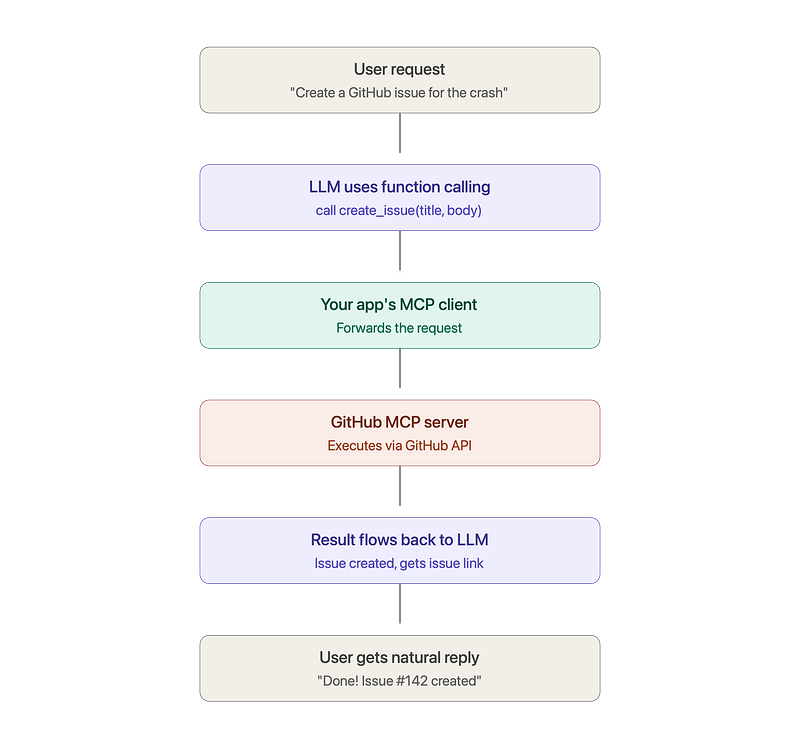
Function Calling is the language the model speaks. MCP is the plumbing that carries the request to the right place. One is the decision layer, the other is the transport and integration layer.
What Does MCP Mean for Mobile Developers?
Honest answer: today, MCP servers mostly run on desktops and cloud backends. But this matters for you in three real ways:
-
Your backend becomes MCP-powered. Your Android or iOS app talks to your backend, and your backend connects to MCP servers for databases, CRMs, payment systems, and internal tools. Your app gets superpowers without any extra client-side code.
-
Your development workflow already uses MCP. Tools like Claude Code, Cursor, and Android Studio’s AI features use MCP servers to access your project files, run Gradle tasks, and query documentation. You are benefiting from MCP even if you never wrote a line of MCP code.
-
You can build an MCP server for your product. Imagine you work on a food delivery platform. You build one “Orders MCP Server”, and suddenly every AI assistant in the world (Claude, ChatGPT, Gemini-powered apps) can integrate with your platform. That is massive distribution.
Part 3: AI Agents (The Brain That Uses Everything)
What is an AI Agent?
Here is where everything comes together.
Function Calling gives the model hands. MCP gives it a universal way to connect those hands to tools. But someone still needs to decide what to do, in what order, and when to stop.
That someone is the AI Agent.
An AI Agent is an AI system that can autonomously plan, take actions using tools, observe results, and keep working step by step until a goal is achieved.
The key word is autonomously. In simple function calling, there is usually one question, one tool call, one answer. An agent runs a loop.
The Agent Loop (This is the Heart of It)
Every AI agent, no matter how fancy, runs this loop:
1. THINK   → What is the goal? What should I do next?
2. ACT     → Call a tool (via function calling / MCP)
3. OBSERVE → Look at the result. Did it work? What did I learn?
4. REPEAT  → Go back to step 1 until the goal is done
This is often called the ReAct pattern (Reason + Act).
A Simple Example to Feel the Difference
User request: “Plan my Goa trip for next weekend.”
Function Calling alone (single shot): The model calls searchFlights("Goa", nextWeekend) and shows you flights. Done. One question, one tool, one answer.
An AI Agent (autonomous loop):
Think: “I need flights, hotel, weather, and an itinerary. Let me start with dates.”
Act:   getCalendar() → user is free Sat-Sun
Think: “Good. Now flights.”
Act:   searchFlights(”DEL”, “GOI”, dates) → cheapest is 6 AM Saturday
Think: “Now a hotel near Baga Beach within budget.”
Act:   searchHotels(”Baga”, budget) → found 3 options
Think: “Weather check, monsoon season is risky.”
Act:   getWeather(”Goa”, dates) → light rain Sunday
Think: “I should suggest indoor options for Sunday. Now build the plan.”
Act:   Compose final itinerary
Done:  Presents complete trip plan with flights, hotel, and a rain-adjusted itinerary
Same tools. Completely different level of capability. The agent chained multiple tool calls, adapted based on results (rain on Sunday changed the plan), and stopped when the goal was complete.
The Anatomy of an AI Agent
Every serious agent has four parts. Remember these four:
-
Brain (LLM): The reasoning engine. Gemini, Claude, GPT.
-
Tools: The hands. Exposed via function calling and connected via MCP or direct APIs.
-
Memory: Short-term memory (the current conversation and task state) and long-term memory (user preferences, past interactions, often stored in a vector database).
-
Planning/Orchestration: The loop logic. Deciding the next step, handling errors, knowing when to stop or when to ask the human for confirmation.
Real-World Mobile Examples of Agents
1. Customer support agent inside your app User: “My order arrived damaged, I want a refund.” The agent checks the order, verifies the delivery photo, checks refund policy, initiates the refund, sends a confirmation email, and offers a discount coupon. Five tool calls, zero human agents involved, all inside your app’s chat screen.
2. Personal finance agent in a fintech app “Help me save 5000 rupees this month.” The agent analyzes transactions, finds subscriptions the user never uses, suggests cancellations, sets spending alerts, and checks in weekly. This is an ongoing, multi-step, stateful task. Pure agent territory.
3. On-device agents (the near future for us) Google’s Gemini on Pixel devices and Apple Intelligence are moving toward system-level agents that can operate across apps: “Find the PDF Rahul sent me on WhatsApp last week and email it to my CA.” That request touches WhatsApp, the file system, contacts, and Gmail. This is agentic behavior at the OS level, and mobile developers who understand how to expose their app’s capabilities (through App Intents on iOS or App Functions on Android) will win here.
4. Coding agents you already use Claude Code, Cursor Agent, and Gemini in Android Studio are agents. You say “fix this crash”, and they read the stack trace, open files, edit code, run the build, see it fail, fix again, and repeat until the build passes. That is the agent loop running live in front of you.
Putting It All Together: The Restaurant Analogy
Let me give you one analogy that ties everything into a single picture.
Imagine a restaurant:
-
The LLM is the chef’s brain. Full of knowledge, but standing in an empty room it can cook nothing.
-
Function Calling is the chef’s ability to shout specific instructions: “Get me 2 tomatoes from the fridge!” A precise, structured request.
-
MCP is the standardized kitchen setup. Every appliance (fridge, oven, mixer) has the same type of plug and the same labeled interface, so any chef can walk into any kitchen and instantly use everything without learning custom setups.
-
The AI Agent is the complete head chef running dinner service. Taking the order, planning the courses, delegating tasks, tasting and adjusting, handling a burnt dish by remaking it, and not stopping until the customer’s meal is served.
One brain, one instruction format, one universal kitchen standard, one autonomous chef. Four layers of the same system.
Side-by-Side Comparison
Which One Should You Use? (Decision Guide for Mobile Devs)
Ask yourself these questions:
Q1: Does my AI feature need just 1 to 3 simple actions, like fetching data or triggering one operation? → Use plain Function Calling. Do not over-engineer. A weather chatbot does not need an agent framework.
Q2: Does my system need to connect to many external tools, or will multiple AI apps share the same integrations? → Use MCP on your backend. Build or use MCP servers instead of writing custom glue code for every integration.
Q3: Does my feature involve multi-step tasks, decision making, adapting to results, or working toward a goal? → Build an Agent. Start simple: an LLM in a loop with function calling and clear stopping conditions. Add frameworks (LangGraph, Google ADK, or the Anthropic Agent SDK) only when the complexity truly demands it.
And remember the golden rule: these are layers, not choices. A production-grade AI agent in 2026 typically uses function calling as its action mechanism and MCP as its connectivity standard. You will often use all three together.
Common Mistakes Developers Make
-
Thinking the LLM executes functions. It never does. It only requests. Your code executes. This matters for security: always validate parameters before executing, exactly like you validate any API input.
-
Giving the model too many tools. If you register 40 functions, the model gets confused and picks wrong ones. Keep tool lists focused. 5 to 15 well-described tools work far better than 40 vague ones.
-
Writing bad function descriptions. The model chooses tools based on your descriptions. “Gets data” is useless. “Gets the current delivery status and ETA for a food order using its order ID” is what makes the model accurate. Treat descriptions like prompts, because they are.
-
Building agents without limits. Always set a maximum number of loop iterations, add timeouts, and require user confirmation for sensitive actions like payments or deletions. An agent stuck in a loop calling your paid API is a very expensive bug.
-
Putting API keys in the mobile app. For anything serious, route LLM calls through your backend. Client-side keys get extracted within hours of your APK going public.
The Road Ahead for Mobile Developers
Here is my honest take on where this is going.
Function calling is now a baseline skill, like knowing Retrofit. Every mobile developer should be comfortable defining tools and handling function call responses.
MCP is becoming the integration standard of the AI era, the way REST became the standard for web APIs. Even if you never write an MCP server, understanding it helps you design better AI architectures and speak intelligently in system design interviews, where AI integration questions are already appearing.
Agents are the destination. The apps that win in the next few years will not have a chatbot bolted onto a screen. They will have agents woven into the experience: assistants that complete real tasks, resolve real problems, and feel like a capable team member living inside the app.
The mobile developers who understand all three layers, and more importantly understand how they fit together, will be the ones designing these systems instead of just consuming them.
Summary
-
LLMs alone can only talk, not act.
-
Function Calling lets the model request actions in a structured way. Your code executes them. This is the foundation.
-
MCP is the USB-C of AI: a universal protocol that connects AI apps to tools and data without custom integration code for every pair. It solves the M x N problem.
-
AI Agents are autonomous systems that run a Think → Act → Observe loop, using function calling and MCP underneath, until a goal is achieved.
-
They are not competitors, they are layers of the same stack, and modern AI apps use all three together.
If this blog gave you clarity, share it with one mobile developer friend who keeps mixing up these terms. And tell me in the comments: which AI feature are you planning to build in your app first?
Happy coding!
Level Up Your Mobile Developer Interview !
Mastering AI for Android Developers
Your complete hands-on guide to integrating AI into Android apps — covering Generative AI, LLMs, on-device intelligence, AI APIs, real-world use cases, and practical implementation with modern Android development.
👉 Grab your copy now:
https://medium.com/@anandgaur2207/mastering-ai-for-android-developers-5cc6d62e7d21
Cracking the Mobile System Design Interview Book
Your complete practical guide to mastering Mobile System Design Interviews — covering scalable architecture, Android & iOS system design concepts, high-level design strategies, low-level design patterns, performance optimization, offline-first architecture, real-world case.
👉 Grab your copy now:
https://medium.com/@anandgaur2207/cracking-the-mobile-system-design-interview-book-8ff043db0359
Data Structures & Algorithms for Mobile App Developers Book
Master the Data Structures & Algorithms concepts every Android, iOS, Flutter, React Native, and KMP developer should know. Learn arrays, linked lists, trees, graphs, dynamic programming, searching, sorting, recursion, and problem-solving techniques with practical coding examples and interview-focused explanations.
👉 Grab your copy now:
https://medium.com/@anandgaur2207/data-structures-algorithms-for-mobile-app-developers-74db0ae17376?sharedUserId=anandgaur2207
Crack Android Interviews Like a Pro
Your complete Android interview preparation book — packed with real questions, deep explanations, and practical insights to help you stand out.
👉 Grab your copy now:
https://medium.com/@anandgaur2207/crack-android-interviews-with-confidence-the-only-handbook-youll-need-b87ec525f19c
iOS Developer Interview Handbook
From Swift fundamentals to advanced iOS concepts — a complete handbook to help you prepare smartly and confidently.
👉 Explore the book:
https://medium.com/@anandgaur2207/crack-ios-developer-interviews-with-confidence-the-complete-ios-developer-handbook-f1eabc3d7a21
Flutter Developer Interview Handbook
Ace your next Flutter interview with scenario-based questions, detailed explanations, and hands-on examples that make you stand out.
👉 Explore the book:
https://medium.com/@anandgaur2207/crack-flutter-developer-interviews-with-confidence-the-complete-flutter-developer-interview-6cb53996832c
React Native Developer Interview Handbook
Crack your next React Native interview with confidence!
This guide is packed with scenario-based questions, detailed explanations, and hands-on examples to help you stand out and succeed.
👉 Explore the book:
https://medium.com/@anandgaur2207/react-native-interview-crack-your-next-interview-with-confidence-0d7255a20fe1
Need 1:1 Career Guidance or Mentorship?
If you’re looking for personalized guidance, interview preparation help, or just want to talk about your career path in mobile development — you can book a 1:1 session with me on Topmate.
I’ve helped many developers grow in their careers, switch jobs, and gain clarity with focused mentorship. Looking forward to helping you too!
Found this helpful? Don’t forgot to clap 👏 and follow me for more such useful articles about Android development and Kotlin or buy us a coffee here ☕
If you need any help related to Mobile app development. I’m always happy to help you.
Follow me on: