
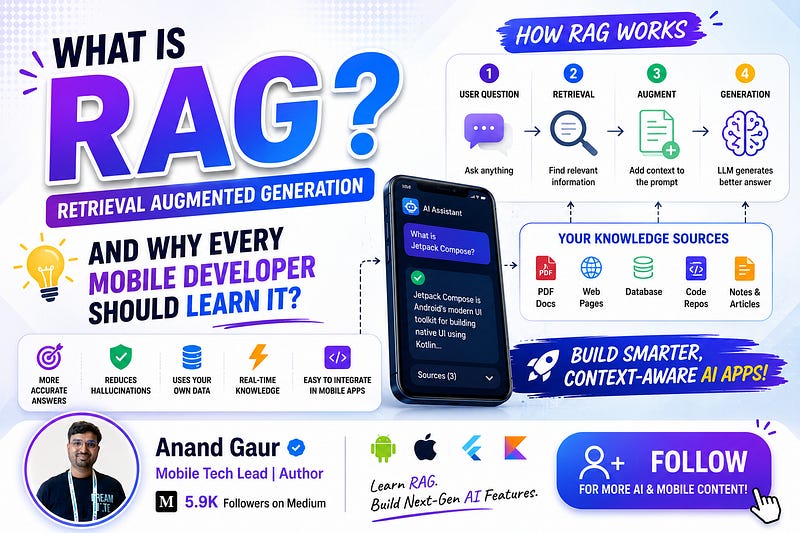
A complete article from basics to advanced, written specially for mobile developers. By the end of this article, you will understand RAG so deeply that you will not need to read another blog on this topic.
Imagine you built a beautiful chatbot inside your Android or iOS app. A user opens it and asks a simple question:
“What is your refund policy for orders placed during the Diwali sale?”
And your AI-powered chatbot confidently replies with something completely wrong. It makes up a policy that does not exist. The user gets frustrated, raises a wrong expectation, and your support team pays the price.
This is the biggest problem with Large Language Models (LLMs) like GPT, Gemini, or Claude. They are incredibly smart, but they only know what they were trained on. They know nothing about your app, your users, your documents, or your company’s data.
RAG solves exactly this problem.
If you are a mobile developer in 2026 and you are adding AI features to your app (and trust me, every app is adding them), RAG is not optional knowledge anymore. It is a core skill, just like knowing how to call a REST API was ten years ago.
So grab a cup of chai, and let us understand RAG completely, step by step, from absolute basics to advanced concepts.
First, Let Us Understand the Problem
Before learning any technology, always ask one question: what problem does it solve?
LLMs have three big limitations:
1. Knowledge Cutoff
Every LLM is trained on data up to a certain date. If a model was trained till January 2025, it knows nothing about anything that happened after that. Ask it about your app’s latest feature released last week, and it will either say “I don’t know” or worse, it will confidently make something up.
2. Hallucination
This is the scary one. When an LLM does not know an answer, it does not always admit it. Instead, it generates a response that sounds correct but is factually wrong. This is called hallucination. For a fun demo app, this is okay. For a banking app, a healthcare app, or an e-commerce app, this is a disaster.
3. No Access to Private Data
LLMs are trained on public internet data. They have never seen:
-
Your company’s internal documents
-
Your app’s FAQ and help articles
-
Your user’s personal notes, chats, or files
-
Your product catalog and pricing
-
Your codebase documentation
So when a user asks a question about any of these, the LLM simply cannot answer correctly.
Now the obvious question is: how do we make the LLM answer questions about data it has never seen?
There are two popular approaches. Let us compare them quickly, because this comparison is asked in almost every AI interview.
Fine-Tuning vs RAG: The Classic Comparison
Fine-tuning means taking a pre-trained model and training it further on your own data. Think of it like sending an already educated engineer for a specialized company training.
Sounds great, right? But fine-tuning has serious problems:
-
It is expensive. You need GPUs, ML expertise, and time.
-
It is static. If your data changes tomorrow (and it always does), you need to fine-tune again.
-
It does not eliminate hallucination. The model can still make things up.
-
You cannot trace where an answer came from.
RAG takes a completely different and much smarter approach. Instead of teaching the model your data, RAG says:
“Do not change the model at all. Just give it the right information at the right time, and let it answer using that information.”
Think of it like an open-book exam. Fine-tuning is like memorizing the whole book before the exam. RAG is like walking into the exam with the book in your hand, flipping to the right page, and writing the answer.
Which student performs better when the syllabus keeps changing every week? Obviously the open-book one. That is RAG.
So What Exactly Is RAG?
RAG stands for Retrieval-Augmented Generation. Let us break the name itself, because the name literally explains the whole concept:
-
Retrieval: Fetch the most relevant information from your own data (documents, database, notes, FAQs).
-
Augmented: Add that fetched information to the user’s question.
-
Generation: Let the LLM generate an answer using both the question and the fetched information.
In one simple line:
RAG = Search your data first, then let the AI answer using what was found.
That is it. That is the entire concept. Everything else is implementation detail. But those details are exactly where the real engineering happens, so let us go deeper.
How RAG Works: Step by Step
A RAG system has two phases. Understanding these two phases separately will make everything click.
Phase 1: Indexing (Done Once, Before Users Ask Anything)
This is the preparation phase. Here you take all your data and make it “searchable by meaning”. It has four steps:
Step 1: Load your data. Collect your documents: PDFs, FAQs, help articles, product descriptions, user notes, whatever your app needs to answer questions about.
Step 2: Chunking (splitting into small pieces). LLMs and search systems work better with small, focused pieces of text. So we split large documents into smaller chunks, usually 200 to 500 words each. Why? Because if a user asks about “refund policy”, we want to fetch only the refund paragraph, not the entire 50-page policy document.
Step 3: Create embeddings. This is the magic step, so read carefully.
An embedding is a way of converting text into a list of numbers (called a vector) that captures the meaning of the text. For example:
-
“How do I return my order?”
-
“What is the process to send back a product?”
These two sentences use completely different words, but their meaning is almost the same. So their embeddings (number lists) will be very close to each other mathematically.
This is the superpower of embeddings: they let us search by meaning, not by keywords. Traditional keyword search would fail to match these two sentences. Embedding-based search matches them easily.
An embedding model (like Gemini’s embedding model or open-source models) does this conversion for you. You just send text, and you get back a vector of numbers, typically 384, 768, or 1536 numbers long.
Step 4: Store in a vector database. All these embeddings, along with their original text chunks, are stored in a special database called a vector database. This database is optimized for one job: given a new vector, find the stored vectors that are closest to it, extremely fast.
Popular vector databases include Pinecone, Chroma, Weaviate, Qdrant, and for mobile, options like ObjectBox and SQLite with vector extensions (we will talk about mobile-specific options in detail later).
Phase 2: Retrieval and Generation (Happens on Every User Query)
Now your data is indexed. A user opens your app and types a question. Here is what happens:
Step 1: Convert the question into an embedding. The same embedding model converts the user’s question into a vector.
Step 2: Search the vector database. The vector database compares the question’s vector with all stored vectors and returns the top matching chunks, usually the top 3 to 5 most relevant pieces of text. This comparison typically uses a mathematical technique called cosine similarity, which measures how close two vectors point in the same direction.
Step 3: Build the augmented prompt. Now we combine everything into one prompt for the LLM. It looks something like this:
You are a helpful assistant for ShopEasy app.
Answer the user’s question using ONLY the context below.
If the answer is not in the context, say “I don’t have that information.”

Context:
1. Refunds for sale items are processed within 7 working days...
2. During festival sales, exchange is allowed but cash refund is not...
3. To initiate a return, go to Orders > Select Item > Return...

User Question: What is your refund policy for orders placed during the Diwali sale?
Step 4: The LLM generates the answer. The model now has the exact, correct, up-to-date information right in front of it. It generates an accurate answer, grounded in your real data. No hallucination, no outdated knowledge.
And notice one beautiful thing in the prompt above: we told the model to say “I don’t have that information” if the context does not contain the answer. This single instruction dramatically reduces hallucination.
That is the complete RAG pipeline:

Read this flow twice. If you understand this diagram, you understand RAG.
A Simple Analogy to Remember Forever
Think of RAG as a smart librarian working with a brilliant professor.
-
The professor (LLM) is extremely intelligent and can explain anything, but he has not read your company’s private books.
-
The librarian (retrieval system) is not very smart at explaining things, but she knows exactly where every book and every page is.
When a student (user) asks a question, the librarian quickly finds the right pages and hands them to the professor. The professor reads those pages and gives a perfect, well-explained answer.
Neither of them could do this alone. Together, they are unbeatable. That is RAG.
Why Should a Mobile Developer Specifically Care?
Fair question. RAG sounds like a backend or ML engineer’s job, right? Wrong. Here is why RAG matters directly to us mobile developers.
1. AI Features Are Now Expected in Mobile Apps
Users now expect a smart assistant inside every serious app. Banking apps have AI helpers, shopping apps have AI product finders, note-taking apps have “chat with your notes” features. Someone has to build the mobile side of these features, and increasingly, the whole pipeline. That someone is you.
2. On-Device AI Is Exploding
This is the big one. With Gemini Nano on Android (via AI Core and ML Kit GenAI APIs), Apple Intelligence and Foundation Models framework on iOS, and small open models like Gemma and Phi running on phones, LLMs now run directly on the device.
But on-device models are small. They hallucinate more and know less. Guess what fixes that? RAG. On-device RAG (local embeddings + local vector search + local small model) is becoming one of the hottest architecture patterns in mobile.
3. Privacy Is a Mobile-First Concern
Mobile apps deal with deeply personal data: messages, photos, health data, notes, finances. Users and regulators do not want this data sent to a cloud LLM. With on-device RAG, the user’s personal data never leaves the phone, and yet the AI can answer questions about it. This is a massive selling point.
4. Offline Capability
A field-service app, a travel app, a medical reference app for rural areas: these need AI answers without internet. On-device RAG makes an offline AI assistant possible. Cloud-only AI simply cannot compete here.
5. Cost Control
Every cloud LLM call costs money. If your app has a million users asking questions daily, your API bill will make your CFO cry. RAG helps in two ways: retrieval narrows the context (fewer tokens = cheaper calls), and on-device RAG eliminates the API call entirely for many queries.
6. Career Growth
Let me be direct. Mobile developers who only know UI and API integration are becoming a commodity. Mobile developers who can design and ship AI-powered features end to end are rare and highly paid. RAG sits exactly at that intersection.
RAG Architectures for Mobile Apps
Now let us get practical. As a mobile developer, you have three architecture choices. Each has clear trade-offs.
Architecture 1: Server-Side RAG (Most Common Today)

The entire RAG pipeline lives on your backend. The mobile app just sends the user’s question and displays the answer (usually with streaming for a good UX).
Best for: Company knowledge bases, product catalogs, customer support bots, any shared data.
Mobile developer’s job here: Build a great chat UI, handle streaming responses token by token, manage loading and error states, cache conversations locally, and handle offline gracefully.
Pros: Powerful models, large data capacity, easy to update data centrally. Cons: Needs internet, ongoing API costs, user data goes to the server.
Architecture 2: On-Device RAG (The Future, Rapidly Becoming Present)

Everything happens on the phone. Nothing leaves the device.
Best for: Personal data use cases: “chat with my notes”, “search my documents by meaning”, “summarize my messages”, journaling apps, health apps.
Tools you would use:
-
Android: ML Kit GenAI APIs / Gemini Nano via AI Core, MediaPipe LLM Inference API for models like Gemma, TensorFlow Lite (LiteRT) for embedding models, and ObjectBox or SQLite-based vector search for storage. Google has also shown on-device RAG patterns through its AI Edge RAG library.
-
iOS: Apple’s Foundation Models framework, Core ML for embedding models, and local vector search libraries or simple in-memory cosine similarity for small datasets.
Pros: Full privacy, works offline, zero API cost per query. Cons: Small models are less capable, embeddings and inference consume battery and memory, storage limits how much data you can index.
Architecture 3: Hybrid RAG (Best of Both Worlds)
Personal and sensitive queries are handled on-device. Complex or general queries fall back to the cloud. Many production apps are converging on this pattern because it balances privacy, cost, and capability.
Real-World Examples You Already Use
RAG is not theory. You are using RAG-powered products every single day:
-
Customer support chatbots in apps like Swiggy, Zomato, or your bank’s app. When the bot accurately quotes the exact policy applicable to your order, that is RAG fetching from their policy documents.
-
Notion AI and Evernote AI answering questions about your notes. The AI never trained on your notes. RAG retrieves the relevant ones at query time.
-
GitHub Copilot Chat answering questions about your repository. It retrieves relevant files from your codebase and feeds them to the model.
-
E-commerce assistants like “Will these shoes suit monsoon weather?” The assistant retrieves that product’s description, material details, and reviews, then answers.
-
Google’s AI Overviews and Perplexity are essentially RAG at internet scale: search first, retrieve pages, then generate an answer with citations.
-
Healthcare and legal apps where the AI must quote from verified medical guidelines or actual law documents, never from imagination.
Let Us Build One: A Conceptual Walkthrough for Android
Theory is good, but as developers we understand code. Here is a simplified conceptual flow of an on-device RAG feature in an Android app: “Chat with my Notes” in Kotlin. (This is simplified pseudocode to show the flow, not a copy-paste library tutorial.)
Step 1: Index the user’s notes (runs in background when notes change).
suspend fun indexNotes(notes: List<Note>) {
    notes.forEach { note ->
        // 1. Split long notes into chunks
        val chunks = chunkText(note.content, maxWords = 300)
chunks.forEach { chunk ->
            // 2. Convert chunk to embedding using an on-device model
            val embedding: FloatArray = embeddingModel.embed(chunk)
            // 3. Store chunk + embedding in local vector store
            vectorStore.insert(
                text = chunk,
                vector = embedding,
                noteId = note.id
            )
        }
    }
}
Step 2: Answer a user’s question.
suspend fun askMyNotes(question: String): String {
    // 1. Embed the question
    val queryVector = embeddingModel.embed(question)
// 2. Find top 4 most similar chunks (cosine similarity)
    val topChunks = vectorStore.search(queryVector, topK = 4)
    // 3. Build the augmented prompt
    val prompt = “”“
        Answer the question using only the notes below.
        If the answer is not present, say you could not find it.
        Notes:
        ${topChunks.joinToString(”\n\n”) { it.text }}
        Question: $question
    “”“.trimIndent()
    // 4. Generate answer with on-device LLM (e.g., Gemini Nano)
    return onDeviceLlm.generate(prompt)
}
Look at how simple the core logic is. Embed, search, stuff into prompt, generate. The intelligence is in the pipeline design, not in complicated code.
For the vector store on mobile, you can start extremely simply: store embeddings in Room or SQLite and compute cosine similarity in Kotlin for a few thousand chunks. It is fast enough. Only when your data grows large do you need dedicated on-device vector search solutions like ObjectBox.
Cosine similarity itself is just a few lines:
fun cosineSimilarity(a: FloatArray, b: FloatArray): Float {
    var dot = 0f; var normA = 0f; var normB = 0f
    for (i in a.indices) {
        dot += a[i] * b[i]
        normA += a[i] * a[i]
        normB += b[i] * b[i]
    }
    return dot / (sqrt(normA) * sqrt(normB))
}
That is the “magical semantic search” everyone talks about. Just a dot product and two square roots.
Going Advanced: Concepts That Separate Beginners from Pros
You now know basic RAG. But production RAG systems need more. These are the concepts that come up in senior-level discussions and interviews.
1. Smart Chunking Strategies
Naive chunking (cut every 300 words) can split a sentence or separate a heading from its content. Better strategies:
-
Semantic chunking: Split at natural boundaries like paragraphs, headings, or topic changes.
-
Overlapping chunks: Each chunk shares 10 to 20 percent content with the previous one, so context is never lost at boundaries.
-
Metadata-rich chunks: Store title, section, date, and source with each chunk, so you can filter (for example, only search within “refund policies”).
Chunking quality directly decides RAG quality. Garbage chunks in, garbage answers out.
2. Hybrid Search
Embedding search is great for meaning, but it can miss exact terms like product codes, error codes, or names. Keyword search (like BM25) is great for exact terms but misses meaning. Hybrid search runs both and merges results. Production systems almost always use hybrid search.
3. Reranking
The vector DB gives you the top 20 candidate chunks quickly but roughly. A reranker is a second, more careful model that re-scores those 20 candidates against the query and picks the best 3 to 5. Think of it as a shortlist followed by a detailed interview. Reranking noticeably improves answer quality.
4. Query Transformation
Users type messy queries. Advanced RAG rewrites them before searching:
-
Query expansion: “refund kaise milega” becomes “How can I get a refund for my order?”
-
Multi-query: Generate 3 variations of the question, search with all, merge results.
-
HyDE (Hypothetical Document Embeddings): Ask the LLM to write a fake ideal answer first, then search using that answer’s embedding. Sounds weird, works surprisingly well.
5. Agentic RAG
Instead of one fixed pipeline, an agent decides dynamically: Should I search the vector DB? Should I search the web? Should I query the SQL database? Do I need to search again with a better query because the first results were weak? The LLM itself controls the retrieval loop. This is where RAG meets AI agents, and it is the direction the industry is moving in.
6. GraphRAG
Regular RAG retrieves isolated chunks. GraphRAG builds a knowledge graph of entities and relationships from your data, so it can answer connection-based questions like “Which features were requested by users who also reported crashes?” Powerful for complex, interconnected data.
7. Evaluating RAG Quality
You cannot improve what you cannot measure. RAG evaluation looks at:
-
Retrieval quality: Did we fetch the right chunks? (precision and recall)
-
Faithfulness: Is the answer actually supported by the retrieved chunks, or did the model add its own imagination?
-
Answer relevance: Does the answer actually address the question?
Frameworks like RAGAS help automate this. In a mobile context, also measure latency, memory usage, and battery impact, because a technically perfect RAG feature that drains the battery will get your app uninstalled.
Mobile-Specific Challenges (and How to Handle Them)
Since this blog is for mobile developers, let us be honest about the hard parts of on-device RAG:
1. Model size and memory. Embedding models and small LLMs together can take hundreds of MBs. Use quantized models (int8/int4), download models on demand instead of bundling in the APK, and free memory aggressively when the feature is not in use.
2. Battery and thermal limits. Indexing thousands of notes will heat the phone. Run indexing with WorkManager, preferably when the device is charging and idle. Index incrementally, only new or changed content.
3. Latency and UX. On-device generation is slower than cloud. Stream tokens to the UI as they generate, show the retrieved sources immediately (users love seeing “found in Note: Trip Plan”), and use skeleton loaders. Perceived speed matters as much as actual speed.
4. Storage. Embeddings take space: 10,000 chunks at 768 floats each is roughly 30 MB. Manageable, but monitor it, and consider smaller embedding dimensions for mobile.
5. Cold start. First-time indexing of a user’s data takes time. Do it progressively in the background and let the feature work partially even while indexing continues.
Common Mistakes Beginners Make
-
Skipping the “answer only from context” instruction in the prompt, and then wondering why the model still hallucinates.
-
Chunks that are too big (irrelevant noise gets stuffed into the prompt) or too small (context gets fragmented).
-
Indexing everything blindly. Duplicate, outdated, and contradictory documents will poison your retrieval. Clean your data first.
-
Ignoring citations. Always show users where the answer came from. It builds trust and helps debugging.
-
Testing with 5 easy questions and shipping. Build a test set of at least 50 to 100 real user-style questions, including tricky ones where the answer does NOT exist in the data.
-
Treating RAG as one-time setup. Data changes. Build a pipeline to re-index updated content automatically.
Your Learning Roadmap
If you want to go from reading this blog to actually shipping RAG features, follow this path:
Week 1: Foundations. Understand embeddings deeply. Play with an embedding API, embed 20 sentences, compute similarities, and see semantic search work with your own eyes. This “aha moment” is important.
Week 2: Build a toy RAG. Take 10 of your own blog posts or notes, chunk them, embed them, store in a simple list or SQLite, and build a small chat script that answers questions from them. No frameworks, pure fundamentals.
Week 3: Go mobile. Build an Android or iOS app with a server-side RAG backend, or go ambitious and try on-device RAG with Gemini Nano / MediaPipe and local vector search.
Week 4: Go advanced. Add hybrid search, reranking, citations, and evaluation. Measure quality before and after each improvement.
After this one month, you will genuinely be ahead of the majority of mobile developers in the market.
Summary
Let us zoom out for a second.
Every major shift in mobile development created two groups of developers: those who adapted early and those who caught up years later at a disadvantage. It happened with Kotlin, with declarative UI (Compose and SwiftUI), and it is happening right now with on-device AI.
RAG is the bridge between powerful AI models and your app’s real, private, ever-changing data. It is the difference between a chatbot that sounds smart and an assistant that is actually useful. And with on-device AI maturing rapidly on both Android and iOS, mobile developers are uniquely positioned to build RAG experiences that are private, offline, and personal in a way no web product can match.
The concept, as you now know, is beautifully simple: search first, then generate. The engineering craft lies in chunking well, retrieving precisely, prompting carefully, and respecting the constraints of a device that lives in someone’s pocket.
Start small. Embed a few sentences today. Build the toy project this weekend. Ship a real feature next month.
Your users are already expecting it. The only question is whether you will be the developer who builds it.
If this article helped you understand RAG, share it with a fellow mobile developer who is still confused about all the AI buzzwords. And follow me for more deep dives on AI for mobile developers, written in simple language, from one developer to another.
Happy coding!
Level Up Your Mobile Developer Interview !
Mastering AI for Android Developers
Your complete hands-on guide to integrating AI into Android apps — covering Generative AI, LLMs, on-device intelligence, AI APIs, real-world use cases, and practical implementation with modern Android development.
👉 Grab your copy now:
https://medium.com/@anandgaur2207/mastering-ai-for-android-developers-5cc6d62e7d21
Cracking the Mobile System Design Interview Book
Your complete practical guide to mastering Mobile System Design Interviews — covering scalable architecture, Android & iOS system design concepts, high-level design strategies, low-level design patterns, performance optimization, offline-first architecture, real-world case.
👉 Grab your copy now:
https://medium.com/@anandgaur2207/cracking-the-mobile-system-design-interview-book-8ff043db0359
Data Structures & Algorithms for Mobile App Developers Book
Master the Data Structures & Algorithms concepts every Android, iOS, Flutter, React Native, and KMP developer should know. Learn arrays, linked lists, trees, graphs, dynamic programming, searching, sorting, recursion, and problem-solving techniques with practical coding examples and interview-focused explanations.
👉 Grab your copy now:
https://medium.com/@anandgaur2207/data-structures-algorithms-for-mobile-app-developers-74db0ae17376?sharedUserId=anandgaur2207
Crack Android Interviews Like a Pro
Your complete Android interview preparation book — packed with real questions, deep explanations, and practical insights to help you stand out.
👉 Grab your copy now:
https://medium.com/@anandgaur2207/crack-android-interviews-with-confidence-the-only-handbook-youll-need-b87ec525f19c
iOS Developer Interview Handbook
From Swift fundamentals to advanced iOS concepts — a complete handbook to help you prepare smartly and confidently.
👉 Explore the book:
https://medium.com/@anandgaur2207/crack-ios-developer-interviews-with-confidence-the-complete-ios-developer-handbook-f1eabc3d7a21
Flutter Developer Interview Handbook
Ace your next Flutter interview with scenario-based questions, detailed explanations, and hands-on examples that make you stand out.
👉 Explore the book:
https://medium.com/@anandgaur2207/crack-flutter-developer-interviews-with-confidence-the-complete-flutter-developer-interview-6cb53996832c
React Native Developer Interview Handbook
Crack your next React Native interview with confidence!
This guide is packed with scenario-based questions, detailed explanations, and hands-on examples to help you stand out and succeed.
👉 Explore the book:
https://medium.com/@anandgaur2207/react-native-interview-crack-your-next-interview-with-confidence-0d7255a20fe1
Need 1:1 Career Guidance or Mentorship?
If you’re looking for personalized guidance, interview preparation help, or just want to talk about your career path in mobile development — you can book a 1:1 session with me on Topmate.
I’ve helped many developers grow in their careers, switch jobs, and gain clarity with focused mentorship. Looking forward to helping you too!
Found this helpful? Don’t forgot to clap 👏 and follow me for more such useful articles about Android development and Kotlin or buy us a coffee here ☕
If you need any help related to Mobile app development. I’m always happy to help you.
Follow me on: